Quick answer:
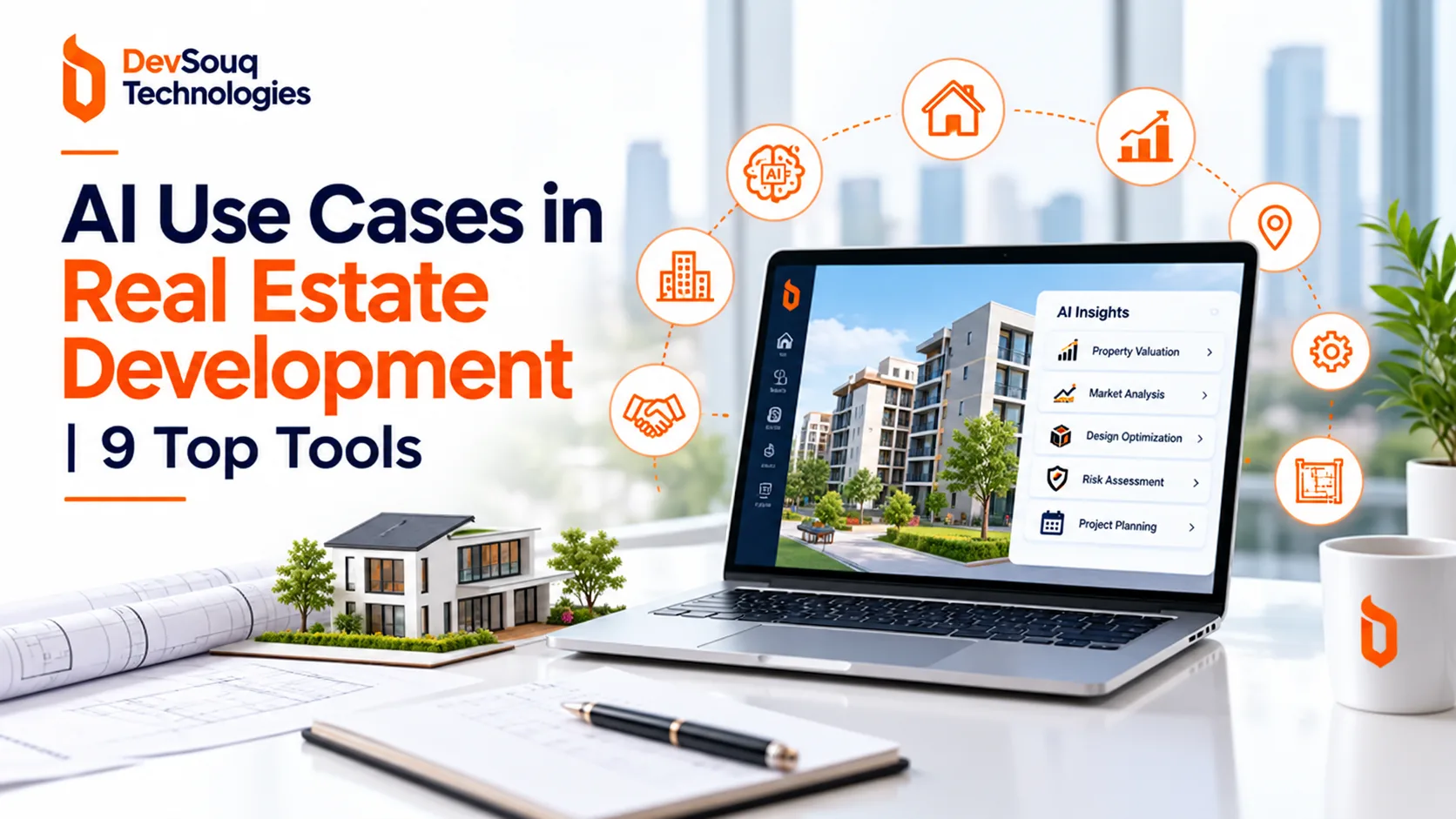
DevSouq Technologies is a cost efficient way to put AI use cases in real estate development and land subdivision into one owned system, with a one time payment and no monthly fee. AI helps most in the early stages: screening land, estimating plot yield, testing layouts, checking zoning rules, costing infrastructure and tracking construction. It drafts and flags, but surveyors, engineers and planning authorities still approve the final plan, and only official records establish ownership. The best start is clean data and one stage, then a shortlist from the nine tools below. Not sure whether to build or buy? Book a free scope review with DevSouq.
Key Takeaways
- Start early. AI delivers the most value before capital is committed, in site screening, feasibility, layout testing and compliance checks.
- Draft and flag, not decide. AI speeds up the first pass, but surveyors, engineers and planning authorities still approve the final plan.
- Ownership stays with official records. AI can flag title or boundary issues, but it cannot establish legal ownership or guarantee approval.
- Theoretical yield is not real yield. A simple area division gives a starting number only. Roads, parks and easements change the final plot count.
- Data decides results. Surveyed boundaries, planning rules and cost records matter more than which AI tool you choose.
- Begin with one stage. Pick one stage and one metric, test it on a past project, then expand.
- Buy for one task, build for the whole pipeline. Specialist tools solve single problems, while a custom system connects acquisition, approvals, construction and sales in one place.
The DevSouq Scope Clarity Session
A free, 30-minute session where you leave knowing the real cost, real timeline, and real risks of your project, whether you ever build with us or not.
Book Your Free Scope Clarity Session →Why AI Matters in Development and Subdivision
Subdivision turns a raw parcel into roads, blocks, plots and services. Each decision cascades: a wider road reduces saleable area, a poor drainage assumption inflates earthworks, and a missed constraint can force a redesign after approval.
A recent academic case study of land subdivision in Riyadh shows how manual the process still is. Researchers interviewed three bodies involved in subdivision: the municipality’s urban planning department, the housing ministry’s urban development sector and the National Housing Company. Their findings described the process as relying mainly on field visits, manual review and paper coordination, with AI tools absent across the eight stages studied. The authors also noted that the study covers one city and did not measure time or cost savings, so it shows the gap in practice, not a proven payoff.
That gap is the opportunity. Wherever work is repetitive, rule based or data heavy, AI can take the first pass and let experts focus on judgment.
The Eight Stages of Land Subdivision and Where AI Fits
| Stage | Traditional approach | Where AI helps |
|---|---|---|
| Data gathering | Field surveys, paper records, manual GIS work | Feature extraction from imagery, LiDAR processing, spatial databases |
| Natural characteristics | Topographic reports, site visits | Terrain, slope and flood analysis from elevation and satellite data |
| Land use | Planner experience, templates | Scenario testing across residential, commercial and mixed use |
| Master plan | Single 2D or CAD plan | Generative layouts compared on yield and cost |
| Laws and regulations | Manual committee review | Automated rule checking against zoning and subdivision codes |
| Stakeholder input | Meetings, paper surveys | Feedback analysis, interactive 3D models |
| Plan approval | Sequential manual review | Workflow tracking and pre submission checks |
| Implementation follow up | Periodic inspections | Drone and 360 degree capture compared with plans |
The staged framework follows the Riyadh study and is a useful checklist: if you cannot name the AI or software step in each stage, that stage is probably still manual.
9 High Value AI Use Cases in Real Estate Development and Land Subdivision
1. Land Identification and Site Screening
Before paying for surveys, developers can screen large areas against access, distance to urban centers, utilities, surrounding development and visible constraints such as flood prone ground or irregular boundaries.
- Rank parcels by a weighted score (frontage, price, utilities, constraints).
- Query records in plain language, such as parcels above a size threshold near a road network.
- Compare competing sites on acquisition price against development potential.
Business value: a shorter, better shortlist before heavy due diligence spend.
2. Feasibility and Highest and Best Use Analysis
Feasibility answers one question: does the project work financially? AI helps by estimating saleable plots, comparing residential, commercial and mixed use scenarios, and forecasting revenue, infrastructure spend and cash flow.
The key discipline is separating theoretical yield from real yield. The worked example below shows why.
3. Generative Subdivision Layouts and Master Planning
Generative tools produce many layout options from a site boundary and a set of rules. You can then compare options on saleable area, road length, block geometry, estimated infrastructure cost and marketability. Manual iteration rarely explores this many alternatives.
Caution: generated layouts still require review by a surveyor, civil engineer, architect and the planning authority.
4. Zoning and Regulatory Compliance Checks
Minimum plot size, frontage, road width, setbacks and open space requirements vary by jurisdiction. AI can read codes and test a proposed plan against them before submission, flagging issues while they are cheap to fix. Repeated review cycles and inconsistent interpretation are among the delays the Riyadh study identified in approvals.
5. Terrain, Drainage and Environmental Screening
Elevation data, contours, slopes and catchments can be analysed to estimate earthworks, expose low lying areas and shape drainage design. Combining flood, soil and hazard layers across several sites at once reduces early stage due diligence cost.
6. Infrastructure Planning and Cost Estimation
Once a layout exists, AI can estimate quantities for roads, drainage, water, sewerage and electrical networks, compare alternative alignments and produce preliminary budgets. Linking those estimates to live cost data shows how a design change moves your margin.
7. Construction Monitoring
Drones and 360 degree capture can be compared with approved plans to spot deviations early. In the Riyadh interviews, officials said deviations were usually minor, under 5 per cent, but that detection depended on periodic site visits, which delays correction.
8. Contract Review and Due Diligence
Language models can extract dates, parties, obligations and unusual clauses from deeds, survey reports, consultant agreements and contractor contracts. They can also flag inconsistencies between documents.
9. Sales, Pricing, Inventory and Customer Management
After launch, AI can estimate demand by plot size and location, suggest price differences for corner, park facing or main road plots, forecast sales velocity, score leads and flag likely installment defaults. A connected custom real estate software platform keeps this data in one system instead of scattered spreadsheets.
Worked Example: Why Theoretical Plot Yield Is Not Real Yield
The figures below are illustrative assumptions, not a surveyed or approved plan.
| Input | Value |
|---|---|
| Gross land area | 100 acres (4,356,000 sq ft) |
| Assumed saleable share | 60 per cent |
| Saleable area | 2,613,600 sq ft |
| Plot size | 5,000 sq ft |
| Theoretical plots | About 522 |
The arithmetic is simply saleable area divided by plot size. Real yield will differ because roads, parks, public facilities, easements, irregular geometry and local rules all change the count. A layout evaluator earns its value by replacing the flat 60 per cent assumption with a figure produced from actual geometry. Test several saleable percentages as a sensitivity range before relying on any single number.
What AI Cannot Do
Being precise about limits builds trust with lenders and regulators.
- It cannot establish legal ownership. AI can flag title or boundary inconsistencies, but authoritative land records and professional verification decide ownership.
- It cannot guarantee approval. Compliance tools reduce risk but do not replace the planning authority.
- It cannot replace surveys and engineering design. Outputs are only as good as the input data.
- It can be confidently wrong. Inconsistent records produce clean looking but unreliable numbers.
Data You Need Before Starting
| Data type | Examples |
|---|---|
| Land | Surveyed boundary, coordinates, contours, elevations, access |
| Planning | Zoning, minimum plot dimensions, road standards, open space rules, approval conditions |
| Market | Comparable sales, asking prices, competing schemes, infrastructure plans |
| Cost | Land, roads, drainage, utilities, fees, taxes, financing |
| Project | Schedule, sales targets, installment plans, contractor payments, collections |
For projects in Pakistan, workflows should also account for provincial revenue records, cadastral maps and the rules of the relevant development authority, which vary by jurisdiction and must be checked against current official requirements. If your data lives in separate files, start with a clean data foundation through AI, machine learning and data engineering services.
What an Integrated AI Platform for Land Development Looks Like
Single tools solve single problems. An integrated platform connects the whole pipeline, so a decision made at the screening stage carries through to design, approvals, construction and sales. The diagram below is a generic reference architecture, not a description of any specific vendor’s product.
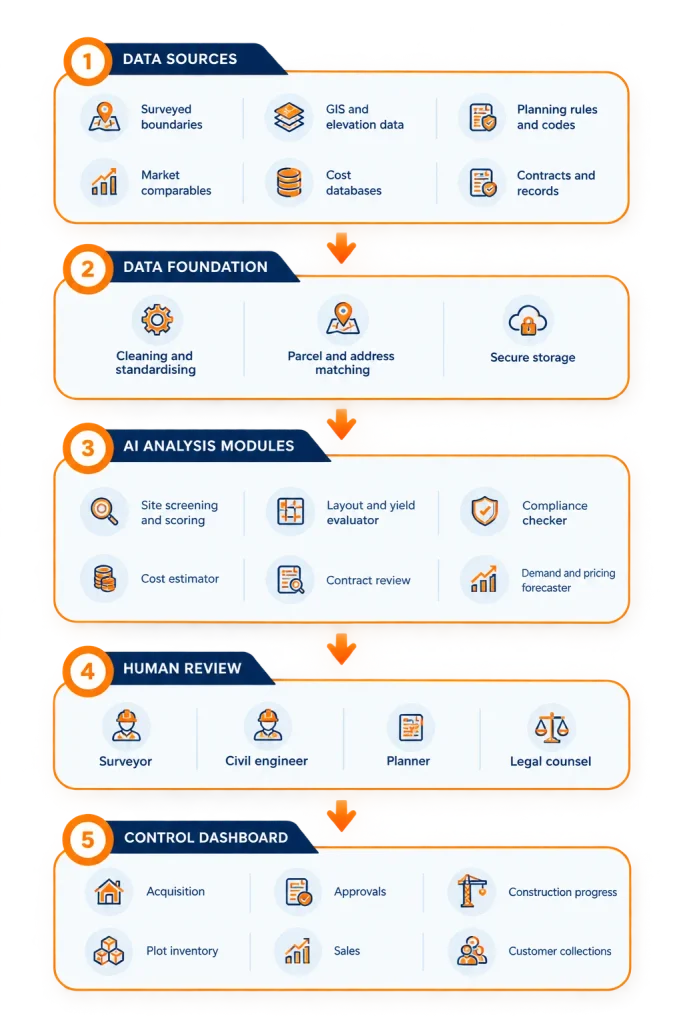
| Layer | Job | Failure if skipped |
|---|---|---|
| Data sources | Supply raw inputs | Models work from guesses |
| Data foundation | Make records consistent | Confident but wrong outputs |
| AI modules | Draft, score and flag | Manual work stays slow |
| Human review | Verify and approve | Legal and engineering risk |
| Dashboard | Show one live picture | Teams work from separate files |
If you only have budget for one layer first, start with the data foundation. Every module above it depends on it.
Build or Buy: Choosing Your AI Stack
No single tool covers the full lifecycle. Specialist products excel at one stage, such as layout generation or permit review. A custom platform suits teams that need data from land acquisition, approvals, construction, inventory and collections in one dashboard.
Ask these questions before deciding:
- Do you need proprietary data or workflows that generic tools cannot support?
- Will subscription fees grow with users or projects?
- Do you need integrations with accounting, payments, CRM or e signature tools?
- Does a single stage matter most, or the whole pipeline?
If most answers point to one narrow task, buy. If they point to an integrated system, consider custom software development.
The 9 Best AI Tools and Platforms for Real Estate Development and Land Subdivision
This hybrid list starts with a custom build option, then covers eight specialist tools. Features and pricing change, so confirm details on each vendor site before buying.
| Rank | Tool | Best for |
|---|---|---|
| 1 | DevSouq Technologies | Custom real estate software and AI features |
| 2 | TestFit | Site layout and feasibility |
| 3 | Autodesk Spacemaker | Urban design and site planning |
| 4 | GreenLite | Zoning and permitting compliance |
| 5 | OpenSpace | Construction capture and monitoring |
| 6 | DocumentCrunch | Contract and lease review |
| 7 | EliseAI | Leasing and property operations |
| 8 | Land Logic | Land intelligence and property data |
| 9 | Land Development AI | Land planning and subdivision |
1. DevSouq Technologies: Best Custom Option With a One Time Cost
1. DevSouq Technologies: Best for Custom Real Estate Development Software
DevSouq Technologies is a custom software development company for real estate businesses that need connected workflows rather than separate tools for every task. Instead of offering a single off-the-shelf land-planning product, DevSouq can build a tailored platform around a developer’s operational requirements.
Key capabilities for land developers include:
- Land and plot management: Organize plot inventory, project records, approvals and customer information in one system.
- Feasibility and reporting: Build project-specific dashboards and reports using available land, cost, sales and project data.
- Sales and financial workflows: Connect lead management, installment schedules, customer collections and contractor expenses.
- AI-powered features: Add forecasting, lead scoring, document extraction or other AI functionality where reliable data and a defined business need support it.
- System integrations: Connect relevant accounting, payment, CRM and communication systems through suitable integrations.
Pricing model: DevSouq positions its custom builds around a one-time project payment rather than recurring per-user subscription fees. The actual cost depends on the required features, integrations, data readiness and project scope.
Best for: Real estate developers who want an integrated system tailored to their own land, sales and project-management workflows.
Important consideration: DevSouq is a custom-build option, not a ready-made subdivision design tool. If you only need rapid site layouts or automated permit checks, a specialist platform may be a faster starting point. AI-generated recommendations and feasibility estimates should still be validated by qualified professionals.
2. TestFit
Key Features
TestFit is a real estate feasibility and site-planning platform that uses generative design to help developers explore potential layouts. Users can define site boundaries, adjust road layouts, set density targets, and test different building or parcel configurations. The software also considers factors such as zoning parameters, parking requirements, topography, and selected site constraints.
Best for: developers comparing many layouts quickly at the concept stage.
Pros
- Generates many layout options quickly
- Gives early yield and feasibility figures for fast go or no go decisions
- Suits the concept stage
Cons
- Outputs are conceptual and need engineer and planner review
- Local rules may need manual setup
Consider: outputs are conceptual. Engineers and planners still need to validate them, and local standards may need manual setup.
3. Autodesk Spacemaker
Key Features
Autodesk Forma is a cloud-based planning and design tool that supports early-stage site development. It combines site-context information, 3D modeling, design automation, and environmental analysis to help teams explore development concepts. Depending on the workflow, users can evaluate factors such as daylight, sunlight, wind, noise, terrain, and site-area metrics. It also supports collaboration and connections with other design tools, including Revit.
Best for: early stage planning on larger sites where environmental performance affects layout.
Pros
- Compares design options on sun, noise and wind
- Useful for larger sites where environment affects layout
- Backed by a large software vendor
Cons
- Aimed at early design, not detailed civil engineering
- Product name has changed, so users may find it confusing
- May be more than a small subdivision needs
Consider: it suits conceptual design, not detailed civil engineering. The product name has changed, so check the current listing and whether the link redirects.
4. GreenLite
Key Features
GreenLite focuses on building permitting, plan review, and code-compliance workflows. Its platform combines AI-supported document processing with expert review and permit management. The process can include organizing application documents, identifying jurisdiction-specific requirements, checking plans for potential compliance issues, coordinating submissions, and tracking progress toward permit issuance.
Best for: teams facing heavy permit review who want fewer resubmissions.
Pros
- Catches zoning and permit issues before formal review
- Can reduce comment cycles and resubmissions
Cons
- Only helps where your jurisdiction is supported
- Covers compliance, not design or feasibility
Consider: coverage depends on the jurisdictions the vendor supports. Confirm your authority is included before you commit.
5. OpenSpace
Key Features
OpenSpace is a construction documentation and visual intelligence platform. It allows project teams to capture site conditions using 360-degree cameras, smartphones, drones, and compatible scanning equipment. Its AI technology maps captured images to project plans, making it easier to review locations and compare site conditions over time. Other workflows support field notes, visual coordination, progress tracking, and sharing project documentation.
Best for: monitoring infrastructure and building works across multiple sites.
Pros
- Builds a dated visual record of progress
- Lets teams compare site conditions with plans without constant visits
Cons
- Needs a regular capture routine to stay useful
- Monitors work but does not help plan or design
Consider: it works best with regular capture routines and clear plan references.
6. DocumentCrunch
Key Features
Document Crunch is an AI-powered construction risk intelligence platform designed to help teams understand contracts and related project documents. Its capabilities include identifying contract risks, answering questions using source documents, comparing document versions, and helping teams track obligations. Its platform can work across related materials such as contracts, specifications, addenda, and other project documents, with findings linked to their sources for review.
Best for: reviewing contractor, consultant and lease agreements at volume.
Pros
- Flags risky clauses, obligations and key dates
- Saves time on contractor, consultant and lease agreements
Cons
- Supports legal review but does not replace a lawyer
- Not relevant to site planning or layout
Consider: AI review supports counsel but does not replace legal advice.
7. EliseAI
Key Features
EliseAI provides AI-driven automation for housing and property-management operations. Its tools support leasing inquiries, prospect follow-ups, tour scheduling, resident communication, maintenance coordination, renewals, and related workflows. The platform can communicate through channels such as phone, text, email, and web chat, while EliseCRM helps centralize leasing and resident information.
Best for: rental and mixed use projects once buildings are ready to lease.
Pros
- Answers prospect and resident questions around the clock
- Helps with tour scheduling and follow up
Cons
- Built for leasing, so it adds little for plot sales
- Only useful once buildings are ready to lease
Consider: it is less relevant for plot sales and subdivision design.
8. Land Logic
Key Features
LandLogic provides parcel-level intelligence intended to support land-use research and property assessment. Its Data Studio capabilities include site selection, interactive due diligence, zoning reports, and multiplex assessment. The platform is designed to organize property-related information so users can investigate potential sites and evaluate their suitability for different land-use opportunities.
Best for: early land identification and parcel research.
Pros
- Brings land and property data into one place
- Speeds up early parcel research
Cons
- Data coverage may vary by region
- Records still need checking against official sources
Consider: data coverage varies by region, so verify it includes your target area and check records against official sources.
9. Land Development AI
Key Areas of Application
LandDevelopment.ai describes AI-enabled workflows across several stages of land development, including site acquisition, zoning, entitlements, infrastructure planning, feasibility analysis, and preconstruction. The concept focuses on applying AI to organize information and assess development opportunities throughout the land development lifecycle.
Best for: teams focused on subdivision planning workflows.
Pros
- Tailored to land planning and subdivision tasks
- Closest match to the article’s main topic
Cons
- You should test sample outputs on your own sites and check local rule handling
Consider: review sample outputs on your own sites and confirm how well it handles local rules.
A Practical Roadmap for Adopting AI in Development
- Pick one stage and one metric. For example, reduce time to produce a feasibility estimate, or increase layout options tested per site.
- Audit your data. Gather surveyed boundaries, planning rules and cost records before buying anything.
- Pilot on a past project. Compare the AI output with the real result to judge accuracy.
- Keep humans in the loop. Require surveyor, engineer and planner review of any layout or compliance output.
- Connect the pieces. Once two or three tools work, integrate them so data flows between acquisition, design, sales and collections.
- Review regularly. Tools and rules change, so reassess accuracy and fit on a schedule.
The DevSouq Scope Clarity Session
A free, 30-minute session where you leave knowing the real cost, real timeline, and real risks of your project, whether you ever build with us or not.
Book Your Free Scope Clarity Session →Conclusion
AI will not replace surveyors, engineers or planners, but it can shorten the slowest and most uncertain stages of development. Start where decisions are cheapest to change, protect data quality, and keep expert review on every output that affects approvals or money. To dive deeper into global proptech benchmarks and market trends, you can also review this comprehensive industry analysis. If you want one owned system that connects your acquisition, sales and project data, explore custom real estate software development with DevSouq Technologies.
Frequently Asked Questions
What are the main AI use cases in real estate development?
The main uses are site screening, feasibility analysis, generative layouts, zoning compliance checks, terrain and flood analysis, infrastructure cost estimation, construction monitoring, contract review and sales forecasting. Most value comes early, before capital is committed and design changes are cheap.
Can AI design a land subdivision on its own?
AI can generate and compare layout options, but it cannot produce an approved plan. A surveyor, civil engineer and the planning authority must review and approve the final design.
Can AI verify land ownership?
No. AI can flag inconsistencies in records or boundaries, but legal ownership is established through authoritative land records and professional verification.
Is custom software better than subscription tools?
It depends on need. Subscription tools suit single tasks and quick pilots. Custom software suits teams needing integrated workflows, owned data and predictable costs, especially where subscription fees grow with usage.
How accurate are AI plot yield estimates?
Accuracy depends on input data and layout geometry. A simple area division gives a theoretical figure only. Real yield falls once roads, parks, easements and local rules are applied, so validate with a surveyed layout.